
Check out the template repo and use yolo-repro for your own investigations: https://github.com/danieljurek/yolo-repro
The beginning
Working in open source is great. I can share full working examples based on real issues.
A few weeks ago, a pull request to the Azure REST API specs repo started failing CI with an out-of-memory (OOM) crash. A tool I had migrated back in 2025 called LintDiff was crashing with FATAL ERROR: Ineffective mark-compacts near heap limit Allocation failed - JavaScript heap out of memory. The REST API Specs repo spans many Azure services and is consumed by many downstream partners. A check that does not produce accurate information could have significant consequences for the ecosystem if it were ignored, so we needed to fix the issue quickly and unblock our partner.
I won’t go into too much detail about the tool because it’s not relevant here… It’s enough to say that the tool calls other tools and correlates and reports errors produced in those other tools. The OOM crash was happening in another one of those tools.
That evening I isolated the cause of the issue to a specific linting rule. I tried plugging in memory profiling tools to the various tools called by LintDiff, and ultimately found success going into node_modules and added logging lines like the following.
1
require('fs').appendFileSync('/home/<user>/azure-openapi-validator/log.log', `Linting rule: ${rule.name} for node givenPath: ${givenPath}...\n`);
See a more detailed write up of the investigation.
Eventually the logs revealed the culprit: a specific rule was applying to a large number of nodes in the spec. Removing the rule resulted in the linter completing successfully without crashing.
My colleague was also online at the time investigating the issue and once I had the root cause narrowed down and shared it he put together a fix for the rule and got the tools in a state where they could validate the PR without crashing.
Log line debugging is cumbersome and I would certainly have been happier if there was a tool that could find the root cause more quickly.
I had tried asking Copilot for help that evening in a vscode session a couple of times, but it only gave me vague advice and wasn’t helpful in narrowing down the specific fault. It’s difficult to know during an investigation whether one more prompt is going to get you the right answer or send you down the wrong path. In that moment, it was easier to go to logging statements and continue investigating in a productive way.
💡 An Idea
Sometime later I thought to myself what if Copilot could try multiple avenues of investigation in parallel to isolate the cause? So I set up a tool that launches a fleet of Copilot agents in parallel within containers to investigate. I called it “YOLO Repro” because the agents run with --yolo and can wreak havoc inside the container without polluting my host machine.

90’s text for emphasis
graph TD
    subgraph Config["Configuration Files"]
        D["Dockerfile"]
        R["repro.sh"]
        P["PROMPT.txt"]
        M["MODELS.txt"]
    end

    Config -->|"prompt × model = N containers"| C1["🐳 Container 01<br/>copilot --yolo --model A"]
    Config --> C2["🐳 Container 02<br/>copilot --yolo --model B"]
    Config --> C3["🐳 Container ..<br/>copilot --yolo --model N"]

    C1 -->|writes| O1["output/01/<br/>result.txt + session.txt"]
    C2 -->|writes| O2["output/02/<br/>result.txt + session.txt"]
    C3 -->|writes| O3["output/NN/<br/>result.txt + session.txt"]

    O1 --> A["🔍 Compare & Analyze"]
    O2 --> A
    O3 --> A
The Setup
The harness has four configuration files that define a debugging task:
| File | Purpose |
|---|---|
Dockerfile | Environment setup: clone repo, install deps, copy repro script |
repro.sh | Script that reproduces the bug (copied into the container) |
PROMPT.txt | Debugging prompt given to each agent |
MODELS.txt | List of models to use (one per line, # for comments) |
And three scripts that operate the harness:
| Script | Purpose |
|---|---|
run.sh | Builds Docker image, launches N containers (prompt × model) |
export_logs.sh | Exports container logs to output/NN/logs.txt |
cleanup.sh | Removes all yolo-repro-* containers |
Step 1: Create a Dockerfile that establishes the right conditions
The Dockerfile builds the sandboxed environment that each agent runs inside. Clone the target repo at a specific commit for reproducibility, install dependencies with lockfiles, and install the Copilot CLI so the agent can do work in the container:
1
2
3
4
5
6
7
8
9
10
11
12
13
14
15
16
17
18
19
20
21
22
23
24
25
26
27
28
29
30
31
32
33
34
35
36
37
FROM ubuntu:latest

ENV DEBIAN_FRONTEND=noninteractive

# Install git, curl, and dependencies for Node.js
RUN apt-get update && apt-get install -y \
    git \
    curl \
    ca-certificates \
    gnupg \
    && rm -rf /var/lib/apt/lists/*

# Install Node.js (required for GitHub Copilot CLI)
RUN curl -fsSL https://deb.nodesource.com/setup_lts.x | bash - \
    && apt-get install -y nodejs \
    && rm -rf /var/lib/apt/lists/*

# Install GitHub Copilot CLI
RUN npm install -g @github/copilot

# Set up work directory
WORKDIR /work

# Clone azure-rest-api-specs at specific commit (shallow)
RUN git init . \
    && git remote add origin https://github.com/Azure/azure-rest-api-specs.git \
    && git fetch --depth 1 origin 76024152eaca0ef4d94badd3d69aaf84ef304338 \
    && git checkout FETCH_HEAD \
    && git remote remove origin

# Install dependencies
RUN cd /work && npm ci

# Copy repro script
COPY --chmod=755 repro.sh /work

CMD ["/bin/bash"]
Step 2: Write a repro.sh that reliably triggers the bug
The repro script must reliably reproduce the bug and produce observable output — error messages, crash logs, exit codes. Pin all external inputs for determinism. Log output to a file agents can examine.
1
2
3
4
5
6
7
8
9
10
11
12
13
14
#!/bin/bash
NODE_OPTIONS=--max-old-space-size=2048 npm exec --no -- autorest \
    --verbose \
    --v3 \
    --spectral \
    --azure-validator \
    --semantic-validator=false \
    --model-validator=false \
    --message-format=json \
    --openapi-type=arm \
    --openapi-subtype=arm \
    --use="$(pwd)/node_modules/@microsoft.azure/openapi-validator" \
    --tag=package-preview-2025-10-01-preview \
    specification/machinelearningservices/resource-manager/readme.md 2>&1 > repro.log
Of note: In the case of an out of memory crash, reduce --max-old-space-size to speed up getting to the reproduction. You probably don’t need to wait for the production-sized heap to fill up.
Step 3: Write PROMPT.txt and MODELS.txt
PROMPT.txt defines the task given to each agent. Each non-empty, non-comment line is treated as a separate prompt. Each prompt is combined with each model from MODELS.txt — so prompt × model = one container. The prompt should tell the agent where the repro script is, what methods are acceptable for investigation, and where to write results:
1
The /work/repro.sh file reproduces an out of memory error we encountered in production. Please debug and determine the root cause of the error. Use any reasonable methods needed to get to the cause, including reading the script, running it, inspecting logs, and analyzing memory usage. Verify that you have isolated the cause. If you succeed, write SUCCESS into /output/result.txt and describe the nature of the error. If you fail, write FAIL into /output/result.txt and explain what you tried. Additionally, create a file called session.txt in /output/ containing a summary of all tools you used, commands you ran, and files you examined during your investigation.
MODELS.txt lists the models to use, one per line:
1
2
3
claude-opus-4.6
gpt-5.3-codex
gemini-3-pro-preview
Of note: The gemini-3-pro-preview model got stuck and didn’t produce output in a recent run. Models aren’t deterministic so you sometimes might get results, get useful results, or get no results at all. Use multiple models to bring the odds into your favor. If, like me, you find claude-opus-4.6 to be very effective and you want to give it more attempts, put it on multiple lines in MODELS.txt… In the end, you’re just making a matrix of models multiplied by prompts.
Step 4: Launch the fleet with run.sh
run.sh reads MODELS.txt and PROMPT.txt, builds the Docker image, then launches one container for each prompt × model combination. Each container gets GH_TOKEN passed through and an output volume mounted:
1
2
export GH_TOKEN="your-github-token"
./run.sh --wait   # Launch and wait for all to finish
Under the hood, each container runs:
1
2
3
4
5
6
docker run -d \
  --name "yolo-repro-$NUM" \
  -e "GH_TOKEN=$GH_TOKEN" \
  -v "$OUTPUT_DIR/$NUM:/output" \
  yolo-repro:latest \
  bash -c "mkdir -p /output && copilot --yolo --model \"$MODEL\" -p \"$PROMPT\""
The --yolo flag lets Copilot CLI run commands freely inside the container without asking for confirmation. Something I’d be wary of doing on my host machine. Copilot responded with a cowboy emoji 🤠 when I told it to use --yolo.
I kicked off the containers and went on to other tasks. The investigation continued while I was being productive elsewhere. Each agent ran the repro, observed the OOM crash, and then pursued its own line of investigation to determine the root cause.
Step 5: Collect and analyze results
When the containers finish, export the logs and examine the results:
1
./export_logs.sh  # Export container logs to output/NN/logs.txt
Each container writes to its output/NN/ directory:
result.txt— First line: SUCCESS or FAIL. Then: root cause analysis or what was tried.session.txt— Full investigation log: tools used, files examined, commands run.logs.txt— Raw container logs (after runningexport_logs.sh).
Most agents will declare SUCCESS even if they didn’t get the right answer. I’m thinking the instructions can be modified here to make that more useful.
Occasionally an agent will find the root cause: The MutabilityWithReadOnly rule applied to too many nodes because its matching criteria was too broad. Removing that rule from the checks got rid of the OOM crash.
The majority of other agents in test runs settled on different conclusions. And Copilot’s summary listed the MutabilityWithReadOnly issue as a possible cause but not the most likely one. The right answer was in the output, but a human would need to verify the different avenues of investigation to reach the ultimate conclusion. Enough Copilot agents could help narrow the search space for the investigator.
When you’re done, clean up:
1
./cleanup.sh      # Remove all yolo-repro-* containers
In a recent run of the 3 models above, one got the right answer!
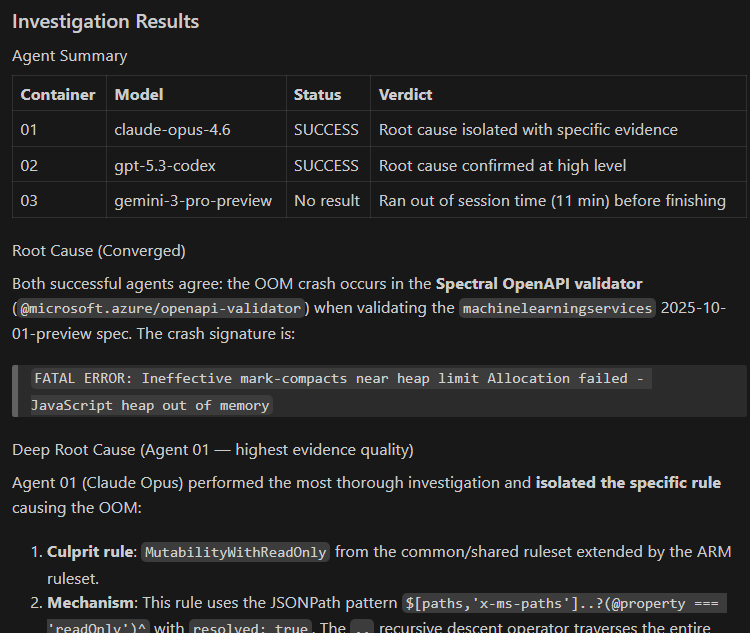
Claude Opus 4.6 wins again!
Takeaways
AI can get to the right answer, but it’s your job to judge the answers. A test run of ten agents gave me ten explanations. They overlapped significantly but weren’t identical. The skilled operator will see several lines of investigation and choose the best among them to pursue.
Summarize the AI output; don’t read all that prose. Every piece of text you read is cognitive load. Don’t spend a bunch of time trying to understand a wall of plausible text generated by an AI… have an AI summarize
Things to improve
Isolate the API key
The containers do need GH_TOKEN to call Copilot and the token I provided had more permissions than narrowly communicating with Copilot APIs. I’ll need to look more closely for a way to issue a token with the specific copilot API permissions and no more.
My investigation agents didn’t do anything obviously harmful.
Exit criteria?
Next time I’ll try including exit criteria like “Isolate the root cause and test a minimal fix or disable troubling features to confirm where a fix should go”… This might encourage the agent to confirm its work before declaring SUCCESS, but it may result in the agent trying to make architectural level fixes to some 3rd party dependency… or recommending re-writing everything in a language that is popular for rewrites. We’ll have to see.
Disclaimers
Hey, this is a personal blog, man. I’m making no claims about features, support, or anything else. This is intended to be used as education and a way to apply AI to your job. Go build something already.
AI Assistance
I used AI to update this prose and instructions as I worked on the template repo.