
A high steaks migration
I recently worked on a project that involved migrating away from a legacy set of PR checks built on a proprietary foundation. These checks validated changes to Azure REST API specs, a GitHub repo holding specifications for all of Azure’s services’ public REST endpoints. The repo was critical to everything from how Azure service REST APIs behave, how SDKs are generated, and documentation for customers and agents building on Azure.
It was vital that useful bits of tooling be extracted from the proprietary system and made to work in our new GitHub Actions architecture.
After all of the code, tests, and reviews finished, we wanted to watch real customer data flowing through the system and ensure that old and new checks agreed.
Since the old system and new system would put checks on GitHub PRs, building a reusable GitHub Workflow made sense. In short: migrate the check, have the new and legacy checks run independently on each PR, then ensure that results matched at the end.
1. Migrate the tool, set up a new workflow to run it
Migrate the existing tool over to the new architecture. While this is the longest step in the process it’s assumed that you’ve done your work and are as confident as you can be (including with testing) that the new tool produces the same outputs as the old tool.
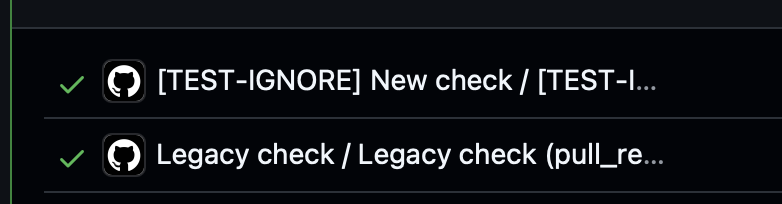
Set up the migrated check with a name like [TEST-IGNORE] New check alongside Legacy check. This makes it easy to visually correlate the old and new test, and makes it clear to users in the repo (in this case, basically all of Azure) that the migrated check is not definitive. Make sure that the check is not mandatory for PRs in GitHub policies or branch protection.
2. Set up a ~Watch workflow
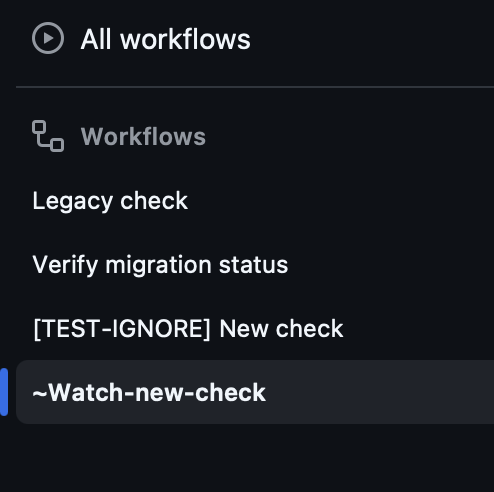
The bulk of UX design in GitHub Actions has to do with thinking about how data is presented in logs and how checks will appear on PRs or wherever else they run. Using ~ in the front of the workflow name sorts it to the bottom of the list in the GitHub Actions UI so it doesn’t distract users.
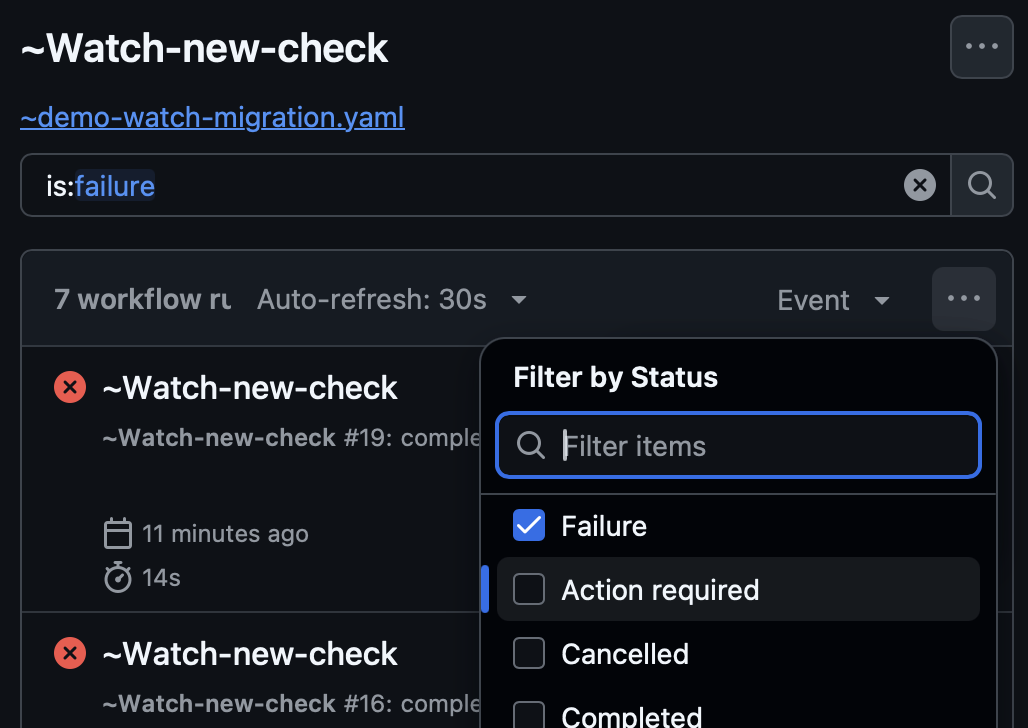
Use the below template to set up your ~Watch workflow, filter by failures, and that will show you PRs and check runs the results differ… Or have your agent check it on a cadence. Now you know which check runs disagree and you can fix issues in your migrated tooling.
Note: The code has been cleaned up by Codex to be more reusable and is available in a separate repo.
The ~Watch-new-check demo watcher listens for both the old and new workflows to finish. When one or more of the checks is in a pending state, it finishes successfully. This is OK since we only care about situations where the checks disagree.
The sample legacy check and new check both run on the same PR. The goal is to migrate to the new check.
I added a couple of PRs to show what happens when the checks agree and disagree:
The agreement PR shows checks agreeing.
The disagreement PR shows checks disagreeing.
The original watcher used check_suite for the proprietary legacy check and workflow_run for the new workflow. The demo uses workflow_run for both because both sample checks are GitHub Actions workflows.
1
2
3
4
5
6
7
8
9
10
11
12
13
14
15
16
17
18
19
20
21
22
23
name: "~Watch-new-check"

# This caller is the only file that needs check names changed when onboarding a
# real migration. These workflow names refer to the two sample checks below.
on:
  workflow_run:
    workflows:
      - "Legacy check"
      - "\\[TEST-IGNORE\\] New check"
    types: [completed]

permissions:
  actions: read
  checks: read
  contents: read
  statuses: write

jobs:
  compare:
    uses: ./.github/workflows/reusable-verify-run-status.yaml
    with:
      legacy_check_name: "Legacy check"
      new_workflow_name: "[TEST-IGNORE] New check"
The brackets are escaped in workflow_run.workflows for GitHub’s trigger parser. The reusable workflow input uses the unescaped check name.
Reusable verification workflow
The caller passes the legacy check run name and new workflow name to the reusable workflow. The workflow loads the comparison code from the default branch and reports the result on the PR.
1
2
3
4
5
6
7
8
9
10
11
12
13
14
15
16
17
18
19
20
21
22
23
24
25
26
27
28
29
30
31
32
33
34
35
36
37
38
39
40
41
42
43
44
45
46
47
48
49
50
51
52
53
54
name: Verify migration status

on:
  workflow_call:
    inputs:
      legacy_check_name:
        description: Name of the existing check run to compare
        required: true
        type: string
      new_workflow_name:
        description: Name of the newly onboarded workflow to compare
        required: true
        type: string

permissions:
  actions: read
  checks: read
  contents: read
  statuses: write

jobs:
  compare:
    name: Compare completed results
    # ‼️ TODO: Set this criteria to trigger on the types of checks your system is using.
    if: github.event_name == 'workflow_run' && github.event.workflow_run.event == 'pull_request'
    runs-on: ubuntu-latest
    timeout-minutes: 10
    steps:
      # workflow_run has a write token. Load the comparison code from the trusted
      # default branch, never from the pull request being evaluated.
      - uses: actions/checkout@3d3c42e5aac5ba805825da76410c181273ba90b1 # v7.0.1
        with:
          ref: ${{ github.event.repository.default_branch }}
          persist-credentials: false
          sparse-checkout: .github/workflows/verify-run-status.js
          sparse-checkout-cone-mode: false

      - name: Compare and report on the pull request
        uses: actions/github-script@3a2844b7e9c422d3c10d287c895573f7108da1b3 # v9.0.0
        env:
          LEGACY_CHECK_NAME: ${{ inputs.legacy_check_name }}
          NEW_WORKFLOW_NAME: ${{ inputs.new_workflow_name }}
        with:
          script: |
            const { verifyRunStatus } = require(
              process.env.GITHUB_WORKSPACE + '/.github/workflows/verify-run-status.js'
            );
            await verifyRunStatus({
              github,
              context,
              core,
              legacyCheckName: process.env.LEGACY_CHECK_NAME,
              newWorkflowName: process.env.NEW_WORKFLOW_NAME,
            });
Comparison logic
The demo retrieves completed results for the configured checks. If one has not completed, the watcher logs a notice and ends successfully without comparing. A later completion event starts a new comparison.
Original Azure REST API Specs watcher JS at e4165be
Complete single-file demo source
1
2
3
4
5
6
7
8
9
10
11
12
13
14
15
16
17
18
19
20
21
22
23
24
25
26
27
28
29
30
31
32
33
34
35
36
37
38
39
40
41
42
43
44
45
46
47
48
49
50
51
52
53
54
55
56
57
58
59
60
61
62
63
64
65
66
67
68
69
70
71
72
73
74
75
76
77
78
79
80
81
82
83
84
85
86
87
88
89
90
91
92
93
94
95
96
// Adapted from Azure/azure-rest-api-specs at e4165be7a953958691125d9c2ec766ac955a9d87.
// The original watcher compared a legacy check run with an onboarded workflow run.
// This file keeps its lookup and comparison logic together so the demo can be copied.

const PER_PAGE_MAX = 100;

function latestByDate(items, field) {
  return [...items].sort(
    (a, b) => new Date(b[field]).getTime() - new Date(a[field]).getTime(),
  )[0];
}

async function getLegacyCheck(github, repo, name, sha) {
  const runs = await github.paginate(github.rest.checks.listForRef, {
    ...repo,
    ref: sha,
    check_name: name,
    status: "completed",
    per_page: PER_PAGE_MAX,
  });
  return latestByDate(
    runs.filter((run) => run.name === name && run.head_sha === sha),
    "completed_at",
  );
}

async function getNewWorkflow(github, repo, name, sha) {
  const runs = await github.paginate(github.rest.actions.listWorkflowRunsForRepo, {
    ...repo,
    head_sha: sha,
    status: "completed",
    per_page: PER_PAGE_MAX,
  });
  return latestByDate(
    runs.filter((run) => run.name === name && run.head_sha === sha),
    "updated_at",
  );
}

async function verifyRunStatus({ github, context, core, legacyCheckName, newWorkflowName }) {
  if (context.eventName !== "workflow_run" || context.payload.action !== "completed") {
    throw new Error("Expected a completed workflow_run event");
  }
  if (context.payload.workflow_run.event !== "pull_request") {
    throw new Error("Expected a workflow started by a pull_request event");
  }

  const repo = context.repo;
  const sha = context.payload.workflow_run.head_sha;
  const legacy = await getLegacyCheck(github, repo, legacyCheckName, sha);
  if (!legacy) {
    core.notice(
      `No completed check run with name: ${legacyCheckName}. Not enough information to judge success or failure. Ending with success status.`,
    );
    return;
  }

  const modern = context.payload.workflow_run.name === newWorkflowName
    ? context.payload.workflow_run
    : await getNewWorkflow(github, repo, newWorkflowName, sha);
  if (!modern) {
    core.notice(
      `No completed workflow run with name: ${newWorkflowName}. Not enough information to judge success or failure. Ending with success status.`,
    );
    return;
  }

  const agrees = legacy.conclusion === modern.conclusion;
  const description = `Legacy: ${legacy.conclusion}; new: ${modern.conclusion}`;
  const sourcePr = context.payload.workflow_run.pull_requests?.[0];
  const statusSha = sourcePr?.head?.sha ?? sha;

  core.info(`${legacy.name}: ${legacy.conclusion} (${legacy.html_url})`);
  core.info(`${modern.name}: ${modern.conclusion} (${modern.html_url})`);
  await github.rest.repos.createCommitStatus({
    ...repo,
    sha: statusSha,
    state: agrees ? "success" : "failure",
    context: "migration-consistency/demo",
    description,
    target_url: `${context.serverUrl}/${repo.owner}/${repo.repo}/actions/runs/${context.runId}`,
  });

  if (agrees) {
    core.notice(`Conclusions match: ${description}`);
  } else {
    core.setFailed(`Conclusions differ: ${description}`);
  }
  return agrees;
}

module.exports = {
  getLegacyCheck,
  getNewWorkflow,
  verifyRunStatus,
};
NOTE Some of the code in
verify-run-status.jsloads up information from the GitHub API instead of the event. This is because events that trigger workflows can arrive out of order and could contain stale data. In cases where a workflow can be run multiple times in a PR, it’s best to get the most definitive status from the GitHub API to avoid a check flipping from “passed” or “failed” to “pending”.
A note on Codex
Building this blog post with Codex (GPT-6-Sol medium) had some good and bad parts. I’ve had great success using GPT models and agents to diagnose issues in the Azure SDK Engineering System but I’m seeing some basic deficiencies that need a steady and knowledgeable engineering hand to get things right:
Good Parts
- Finding the code for these checks in the repo history (after the project completed successfully we removed unused code)
- Transcribing some of the checks was a one shot request to the agent.
Bad Parts
- Refactoring incorrectly: Codex, at my request, attempted to inline JS from across several files to make the demo easier to copy… Independently, it decided to refactor the code after it copied. The refactor was incorrect and would’ve steered you or your agent in the wrong direction!
- Following the naming conventions set out in the blog post: Somehow when setting up the demo repo, Codex opted to get the naming wrong in a bunch of places.
Review your agent’s output in engineering system work. Especially if adapting work for documentation and a broader audience.